

The Dragon PCI FPGA board
Dragon is an FPGA development board that plugs into a PCI and/or USB port.
- Xilinx's FPGA Spartan-II XC2S100, plus FPGA boot-PROM.
- PCI bus (32 bits/32MHz) with target mode reference design.
- USB interface to the FPGA (about 1MBytes/s max sustained), and USB controlled I2C master.
- download/communicate with the FPGA
- program the FPGA boot-PROM
- download the 8051
- control the I2C
- 10BASE-T Ethernet with reference design.
- JTAG interface.
- Top and bottom SIL connectors (can plug into a wide 'solderless-breadboard' for experiments) and dual-row connectors (can be used as motherboard for other projects).
- 8051 microcontroller (on the back of the board). Use of the 8051 is optional. When in use, the 8051 and FPGA can communicate through an 8-bits synchronous bidirectional bus.
- FlashyD compatible.
How it looks
Here's the top side.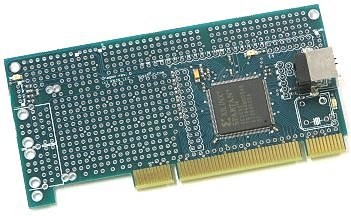
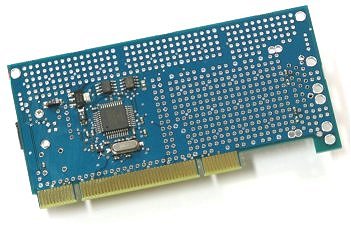
On the bottom, there are the USB-8051 (square IC), the EEPROM and FPGA boot-PROM (2 top rectangles) and voltage regulator.
What can you do with your Dragon?
Any well-trained Dragon can throw flames and smoke. That's easy; just plug the USB to the main power (110 to 240V, depending on where you are). While that will void the warranty, you should get some smoke... and maybe some flames.
Joke apart, the main Dragon attractions are the PCI, USB, Ethernet, plus the LCD connections.
PCI interface
Dragon is a PCI board, see fpga4fun's PCI project that was developed with Dragon.
The FPGA is directly connected to the PCI bus, no complicated interface (PLX...). A target mode reference design is provided.
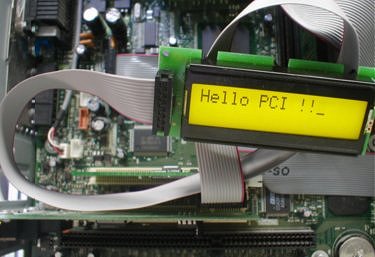
Here's a text LCD controlled through PCI.
USB interface
Dragon incorporates a USB controller. This is used for:- FPGA configuration (takes about 1 second)
- PC communication with the FPGA (at about 1MBytes/s=8Mbits/s)
- FPGA boot-PROM programming (takes about 10 seconds)
USB can be used in standalone mode if you want (you don't have to plug Dragon into a PCI slot, it can be used in USB mode alone, i.e. on your desk).
Also note that both PCI and USB can be used simultaneously (two PCs can be connected to Dragon at the same time). That allows interesting applications, like the PCI logic analyzer where Dragon is plugged in one PC and another PC can spy on the PCI transactions through USB.
Flashy
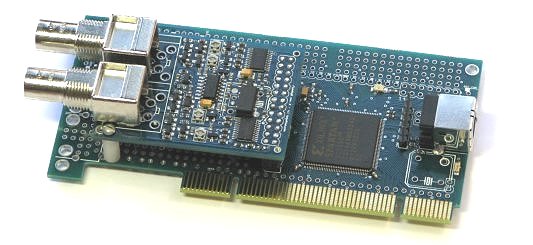
Dragon can be used as motherboard for other projects. See here for example Dragon with a FlashyD acquisition board.
Ethernet
Dragon can accommodate up to two RJ-45 connectors and includes source code for 10BASE-T UDP reception/transmission of Ethernet packets at 10Mbits/s.LCD modules
Dragon can accommodate directly many text module LCDs. See here for the details on text LCD modules.
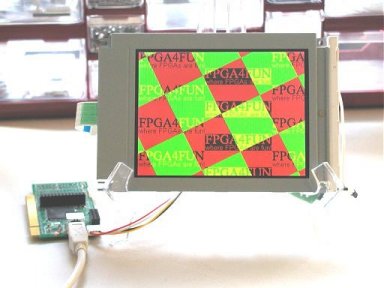
Graphical LCD modules can also be accommodated thought the use of adapters, see here a color graphical LCD.
I2C bus
Dragon has an 'hard macro' I2C bus controller.The controller allows easy control of the I2C bus from a PC.
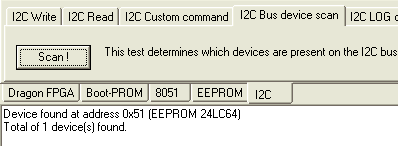
The FPGA is also connected to the I2C bus, which allows more applications, like I2C soft macros, or an I2C logic analyzer.
The I2C bus is connected to an onboard I2C EEPROM (24LC64) and two I2C connectors.
Documentation provided with the board
Board files:- Getting started with your board (PDF)
- Configuration software (Windows EXE) and EzUSB/CyUSB drivers (note: CyUSB driver support added on November 2013)
- Board schematic (PDF)
- USB communication example (HDL source code + C code)
- PCI_IORAM reference design (HDL source code)
- PCI WDM reference driver (C source code + compiled)
- Win32 example application to communicate with the PCI WDM driver from a Win32 application (C source code + compiled)
- PCI logic analyzer (HDL source code)
- Ethernet 10BASE-T reference design (HDL source code + C code)
- I2C 'hard macro' support (C code)
- FlashyDemo (FPGA BIT file + GUI)
- Linux port (unsupported)
As you can see, there is no 'DLL' or 'Active-X' control, just plain HDL and C code, so that you can understand and use the examples natively into your own application.
To purchase a board
Go to the Shop - PCI FPGA development boards page.